Single Sign-On#
Single Sign-On (SSO) is an authentication scheme that allows a user to log in with a single ID to any of several related, yet independent, software systems.
Refer to this Wikipedia article for background information about Single Sign-On.
CMDS supports three industry-standard mechanisms for SSO:
- Microsoft Office 365
- Microsoft Entra ID (formerly Azure Active Directory)
- Security Assertion Markup Language (SAML)
- Learning Tools Interoperability (LTI)
We do not implement or support custom SSO mechanisms due to the potential security and privacy risks associated with them.
Learning Tools Interoperability (LTI)#
Here are some additional details for using LTI for SSO with the CMDS platform.
While LTI is not primarily designed as a SSO mechanism, some of the data it passes in a launch request is about the user. LTI works on the basis of a trust relationship between systems, which is established by means of a key and a secret. This makes it much simpler than providing access to a common identity server.
In LTI, a user is authenticated by a primary system and then can be passed to another system (internal or external) by way of a signed launch message. The system that receives this message verifies its authenticity by inspecting its digital signature, and then implicitly trusting the data it carries; thereby eliminating the need to authenticate the user a second time or reconfirm the user's identity.
This approach makes LTI a low-cost option for implementing SSO between systems.
Refer to this article for details: LTI as a SSO Mechanism
An LTI launch message submitted for SSO access to CMDS looks something like this:
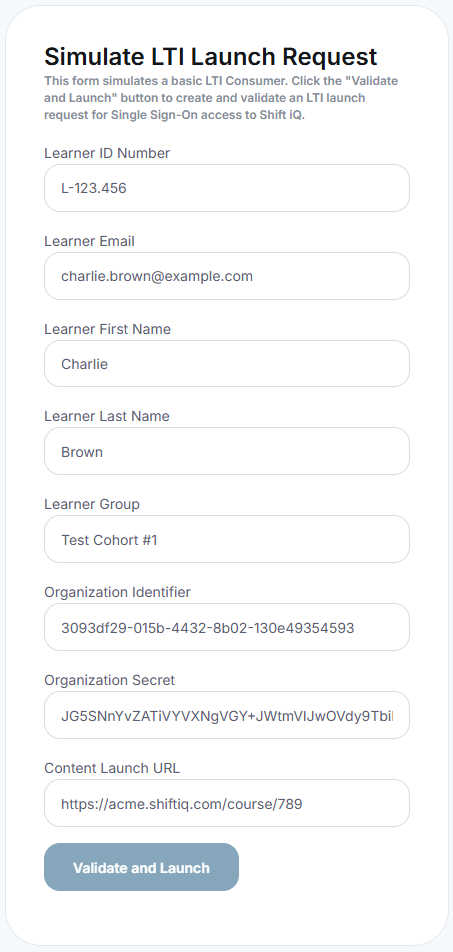
The LTI Launch message is signed with a secure digital signature, using HMAC-SHA1 or HMAC-SHA256, with a secret key that is shared between the two systems.
When CMDS receives this message from a user's web browser, it validates the signature on the message to confirm it is a legitimate interoperability request from an authorized external system.
If the request is valid, then CMDS authenticates the learner and navigates to the requested course in the CMDS Learning Portal.